Recently I worked on a project where I had to push 6,156 scanned PDF documents through a vision-capable LLM to extract 10 structured fields per document. The interesting part of this process is that nobody was sitting in front of a browser waiting for this task to finish. So the process didn’t need to be particularly fast or interactive. I just needed the whole pile processed accurately and the results to be saved somewhere when it was done.
My first instinct was simply to write a script that loops over the source files (perhaps with some configurable level of concurrency) and calls the inference API on each document with a very specific prompt. It would have worked, except I would have ended up paying full price per token, fighting rate limits and throttling, and babysitting retries for hours. Instead, I stumbled onto a not-so-widely-known feature of Amazon Bedrock called batch inference, which lets you run large offline LLM workloads at roughly half the on-demand price while AWS handles the throughput.
The catch is that batch inference is an asynchronous, file-based API: you upload JSONL files to S3, submit a job, and wait minutes to hours for the results to land back in S3. On top of that, there are various limits you need to respect, so you might have to split the work into multiple files, run them as independent batch jobs, and aggregate the results at the end. In practice, the hard part is the orchestration around it, not the model call itself: preparing the input files, waiting hours for jobs to finish, collecting and validating the results, and retrying only the items that failed. In this article, I will show you how to orchestrate Bedrock batch inference with AWS Lambda durable functions in plain TypeScript, without paying for idle compute while your jobs are running.
To ground this in real numbers: on this particular project, the full run over all 6,156 documents finished in 36 minutes for roughly $74. On demand, the same workload would have cost about twice as much. Now, 6,000 documents isn’t massive scale on its own, but imagine you have to process 10x or 100x that, or run the same process every week or every month. That is where the cost savings really start to add up and where investing a little time and effort into orchestration pays off.
We will start with a quick tour of Bedrock batch inference and the sharp edges I hit along the way. Then we will compare four orchestration options and do a short crash course on Lambda durable functions. From there, we will walk through the core TypeScript handler step by step, the CDK stack to deploy it, the patterns that scale it to thousands of documents, local testing, and when to skip all of this.
If you want to skip ahead to the code, the complete example, CDK stack and tests are on GitHub.
Bedrock batch inference in 5 minutes
Before we talk about orchestration, let us look at the shape of the Bedrock batch inference API.
The whole flow has four steps:
- Write your requests into one or more JSONL (JSON Lines) files in an S3 bucket.
- Call
CreateModelInvocationJobwith the input S3 prefix, an output S3 prefix, the model ID, and an IAM service role. - Poll
GetModelInvocationJobuntil the job reaches a terminal state. - Read the output JSONL files that Bedrock wrote to your output S3 prefix.
Each line of an input JSONL file is a JSON object with two fields: a recordId that you choose, and modelInput, whose structure matches the InvokeModel request body you might already have seen if you have run regular inference calls (with the extraction instructions in system, shortened slightly below for readability). Here is a tiny two-line input sample for our running example (extracting purchase orders from supplier emails):
{"recordId":"email-001","modelInput":{"anthropic_version":"bedrock-2023-05-31","max_tokens":2000,"system":"Extract the purchase order from the supplier email. Answer only with JSON...","messages":[{"role":"user","content":"Hi, please ship 10x Widget A at 15.00 EUR each to Acme Warehouse by 2026-12-15. Order PO-4821."}]}}{"recordId":"email-002","modelInput":{"anthropic_version":"bedrock-2023-05-31","max_tokens":2000,"system":"Extract the purchase order from the supplier email. Answer only with JSON...","messages":[{"role":"user","content":"Correction on PO-4822: make it 12 units of Gasket B at 4.50 USD, not 10. Delivery 2026-12-20."}]}}Because JSONL packs each record onto a single line, it is much easier to read when pretty-printed. Here is that first record expanded:
{ "recordId": "email-001", "modelInput": { "anthropic_version": "bedrock-2023-05-31", "max_tokens": 2000, "system": "Extract the purchase order from the supplier email. The email may quote earlier messages: the latest correction wins. Answer only with JSON of this shape: ...", "messages": [ { "role": "user", "content": "Hi, please ship 10x Widget A at 15.00 EUR each to Acme Warehouse by 2026-12-15. Order PO-4821." } ] }}When Bedrock finishes the job, it writes a matching .jsonl.out file under your output prefix. Each line carries your recordId alongside either modelOutput (the same response payload InvokeModel returns) or an error object if that individual record failed. For readability, here are two output records pretty-printed and separated by a blank line (in the actual .jsonl.out file, each record is a single JSON object on its own line):
{  "recordId": "email-002",  "modelOutput": {    "id": "msg_01",    "type": "message",    "role": "assistant",    "content": [      {        "type": "text",        "text": "{\"supplier\":\"...\",\"orderNumber\":\"PO-4822\",\"currency\":\"USD\",\"deliveryDate\":\"2026-12-20\",\"lines\":[{\"sku\":null,\"description\":\"Gasket B\",\"quantity\":12,\"unitPrice\":4.5}],\"total\":54}"      }    ],    "usage": {      "input_tokens": 58,      "output_tokens": 74    }  }}
{  "recordId": "email-001",  "error": {    "errorCode": 400,    "errorMessage": "Input validation failed"  }}
Notice two small details already visible in those two records: email-002 came back before email-001, and the failed record is still present with an error field. Both of those matter when you write the collection step.
The sharp edges I learned the hard way
The four-step summary above makes Bedrock batch inference look almost trivial. In practice, there are quite a few sharp edges that only show up once you start building a real pipeline. Here is the list I collected on my project.
The limits below are the ones in the Bedrock docs and service quotas at the time of writing (November 2026). Several are per model and change over time, so check them for the model you are using.
Minimum job size
This is possibly the most annoying limitation, IMHO: Bedrock rejects any batch job that has too few records. The exact threshold is a per-model service quota (search that page for "Minimum number of records per batch inference job"), and for most models you can’t raise or lower it.
In practice, right now every supported model I checked has the same limit of 100 records. Still, because AWS defines it per model, I wouldn’t be surprised if a future model ships with a different threshold and catches people off guard. It is worth keeping that number in a constant (like MIN_BATCH_RECORDS in the example later) so you can update it in one place if it ever changes.
Maintaining a constant is easy, though. The really annoying part shows up when you combine this minimum with another limitation: there is also a maximum amount of data you can process in a single batch job (we’ll cover the specifics next). For any flexible, real-world workload, that means splitting your requests across multiple batch jobs, which can easily leave you with a final trailing batch that has fewer than the minimum number of records (and the same thing happens for small test runs or when retrying a handful of failed items). You cannot submit that leftover batch to Bedrock batch inference, so you still need an on-demand fallback path that runs those records through regular synchronous inference at full cost.
Are you starting to see why I have been talking about “orchestration”? This is definitely not a simple for loop anymore…
Maximum job size: plan a safety margin
A single Bedrock batch job does not have to come from one giant JSONL file: you point s3InputDataConfig.s3Uri at an S3 prefix (folder), and Bedrock processes all the .jsonl files inside it together. For example, assume you have a bucket with the following files:
s3://my-bucket/runs/run-01/input/chunk-00.jsonls3://my-bucket/runs/run-01/input/chunk-01.jsonls3://my-bucket/runs/run-01/input/chunk-02.jsonlYou can submit all three as a single batch job by pointing s3Uri at the folder prefix:
inputDataConfig: { s3InputDataConfig: { s3Uri: 's3://my-bucket/runs/run-01/input/', s3InputFormat: 'JSONL', },},Because of that, there are two size limits to keep in mind: 1 GB per individual input file, and 5 GB combined across all files in a job for most models (a few Amazon Nova models get 100 GB), plus a cap on total records per job (up to 100,000 for many models). You can check the exact limits for your model on the same Bedrock quotas page by searching for "batch inference job".
In my specific project, I capped each job at 4 GB, a 1 GB safety margin under the 5 GB job quota. Text prompts take a long time to reach 5 GB, but base64-encoded PNG pages for a vision model add up fast. Each 200-document chunk was roughly 102 MB of JSONL (well under the 1 GB per-file limit), so the full 6,156-document input across all 31 chunk files came to about 3.2–3.6 GB, safely under my 4 GB cap. Multi-page records reached 34 MB per input file without issues. Once your input crosses the per-job quota, you need to split those chunk files across multiple batch jobs.
Job lifecycle and terminal states
To understand the next sharp edge, we first need to look at the lifecycle of a batch submission. On its own it isn’t strictly a sharp edge, though it isn’t trivial either, so you could argue it counts as one anyway! 😏
Once you call CreateModelInvocationJob, a batch job moves through a handful of active states (Submitted, Validating, Scheduled, InProgress, and Stopping if you cancel it) before landing in one of five terminal states (Completed, PartiallyCompleted, Failed, Stopped, or Expired):
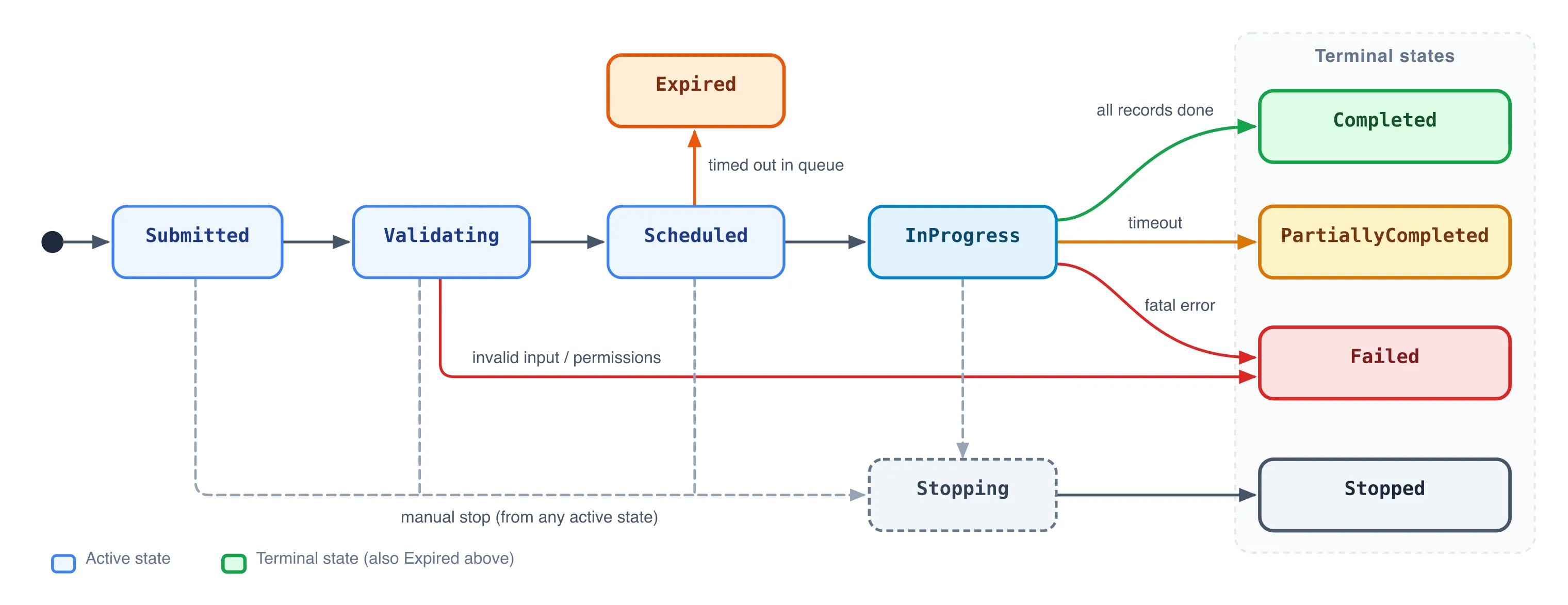
The one terminal state worth calling out right away is PartiallyCompleted. It is not a job crash: it means the job ran out of time before processing every record, and Bedrock still wrote the results it had to S3. Records that never ran are simply missing from the output, while records that ran and failed show up as error lines (and those can appear in a Completed job too). So your pipeline should collect outputs for both Completed and PartiallyCompleted jobs, and treat missing records as failures. And notice Expired sitting above Scheduled in the diagram: that brings us straight to the next sharp edge.
Unpredictable duration and timeouts
Bedrock batch jobs have no latency SLA: they can take anywhere from minutes to hours, with a default timeoutDurationInHours of 24 (you can set anything from 24 to 168). I like to think of this as AWS slotting your batch work into windows of spare capacity when load is lower, a bit like Spot compute for inference, which is what justifies the 50% discount.
As the diagram above shows, what happens when that clock runs out depends on how far the job got: if it timed out while still waiting in the queue (Scheduled) and never started, it transitions to Expired with no output and you have to resubmit it. If it did start processing (InProgress) and only finished part of the dataset before timing out, it ends as PartiallyCompleted, and Bedrock still writes the results for the records it managed to finish to S3 so you only have to re-run the leftovers.
In practice, though, batch jobs can be much faster than you’d expect. Before running my full 6,156-document workload, I guessed it might take anywhere from 1 to 3 hours. The entire run actually finished in 36 minutes, and the main batch job itself took only 20 minutes for all 6,156 records. Compare that with my 200-record trial job, which took ~9 minutes (about 6 minutes queued and validating, and only ~3 minutes actually running inference): most of the time on a small batch job is fixed queue and validation overhead, so scaling up to thousands of records only about doubled the wait.
Output layout and ordering
Bedrock writes one .jsonl.out file for each input .jsonl file you submitted, plus a manifest.json.out file with record and token totals. The docs don’t spell out the exact folder layout, but in my runs Bedrock created a subfolder named after the job ID under the output prefix. Continuing the three-chunk example from earlier, the output bucket ends up looking like this:
s3://my-bucket/runs/run-01/output/<jobId>/chunk-00.jsonl.outs3://my-bucket/runs/run-01/output/<jobId>/chunk-01.jsonl.outs3://my-bucket/runs/run-01/output/<jobId>/chunk-02.jsonl.outs3://my-bucket/runs/run-01/output/<jobId>/manifest.json.outTwo practical rules follow from this:
- List and filter instead of building paths by hand. List all objects under your run’s output prefix and filter for keys ending in
.jsonl.out. That way your collector doesn’t break if AWS changes the subfolder convention, it automatically ignoresmanifest.json.out, and (as we will see in the code) it lets an on-demand fallback write its own.jsonl.outunder the same output prefix. - Never match records by line number. Bedrock processes records in parallel and writes them out in whatever order they finish, not the order they appeared in your input file. Always key everything by
recordIdwhen joining results back to your source data.
IAM: two roles and two ARNs
Setting up IAM for Bedrock batch inference has two quirks that are easy to miss the first time:
- Two roles, plus
iam:PassRole. Because a batch job runs asynchronously inside Bedrock long after your API call returns, Bedrock does not use your Lambda’s execution role to touch S3. Instead, you create a second service role thatbedrock.amazonaws.comcan assume (scoped withaws:SourceAccountandaws:SourceArnpointing tomodel-invocation-job/*to avoid confused-deputy issues) and grant that role read/write access to your S3 prefix. Your Lambda execution role then needsiam:PassRoleon that service role (scoped withiam:PassedToService: bedrock.amazonaws.com) so it is allowed to hand the role ARN toCreateModelInvocationJob. - Cross-region inference profiles need two ARNs. Modern Claude models on Bedrock are typically invoked through a cross-region inference profile (like
eu.anthropic.claude-...), which routes requests across several regions in that geography behind the scenes. That means your IAM policy forbedrock:InvokeModelandbedrock:CreateModelInvocationJobcannot just allow the inference profile ARN in your home region: it also needs the underlying foundation model ARN with a region wildcard (arn:aws:bedrock:*::foundation-model/<model-id>), otherwise calls fail with an unhelpful access-denied error.
We will look at the exact CDK constructs for both of these when we deploy the example later.
Job names are strict
Job names must be 1 to 63 characters, start with a letter or digit, and use only letters, digits, +, - and . after that. Sticking to letters, digits and dashes and slicing to 63 characters avoids submit-time errors (and keeps the name valid as a clientRequestToken, which is stricter: no + or ., and it must end with a letter or digit), so make sure you have decent generation (or sanitisation) logic for them, especially if you derive job names from run IDs, timestamps, or filenames that might contain underscores or run over the length limit. In the example later, each execution receives a runId (using only letters, digits, and dashes, like run-01) and builds the job name with:
const name = `orders-${event.runId}`.slice(0, 63)Not every model supports batch
This is probably the second most annoying limitation, and it hit me right away when I assumed I could just use Claude Opus 5.5. Everything looked fine while I was setting up the bucket, the IAM role, and the input files, right up until CreateModelInvocationJob rejected the request with "Batch inference is not supported for the requested model".
As of November 2026, the Bedrock model card for Claude Opus 5.5 lists only the Standard tier (Batch, Priority, Flex, and Reserved are all listed as “not supported”), while Claude Opus 5’s card lists Batch as supported. The batch supported models page agrees: Opus 5 is there (through cross-region inference profiles only), Opus 5.5 isn’t. AWS gives no reason and no timeline, so definitely check the model card before you build.
So I evaluated Claude Opus 5 instead. On my 50-document golden set, Opus 5 scored 496/500 fields out of the box (and 499/500 with my final multi-pass pipeline), which made switching an easy call. Still, the catalogue of models supported by batch inference is surprisingly smaller than Bedrock’s full catalogue, so this is a very important point to check early, especially if you have strict model requirements.
Putting the sharp edges together: the pipeline we actually need
If you combine all those constraints, a production-ready Bedrock batch pipeline stops looking like a single API call and starts looking like a proper workflow:
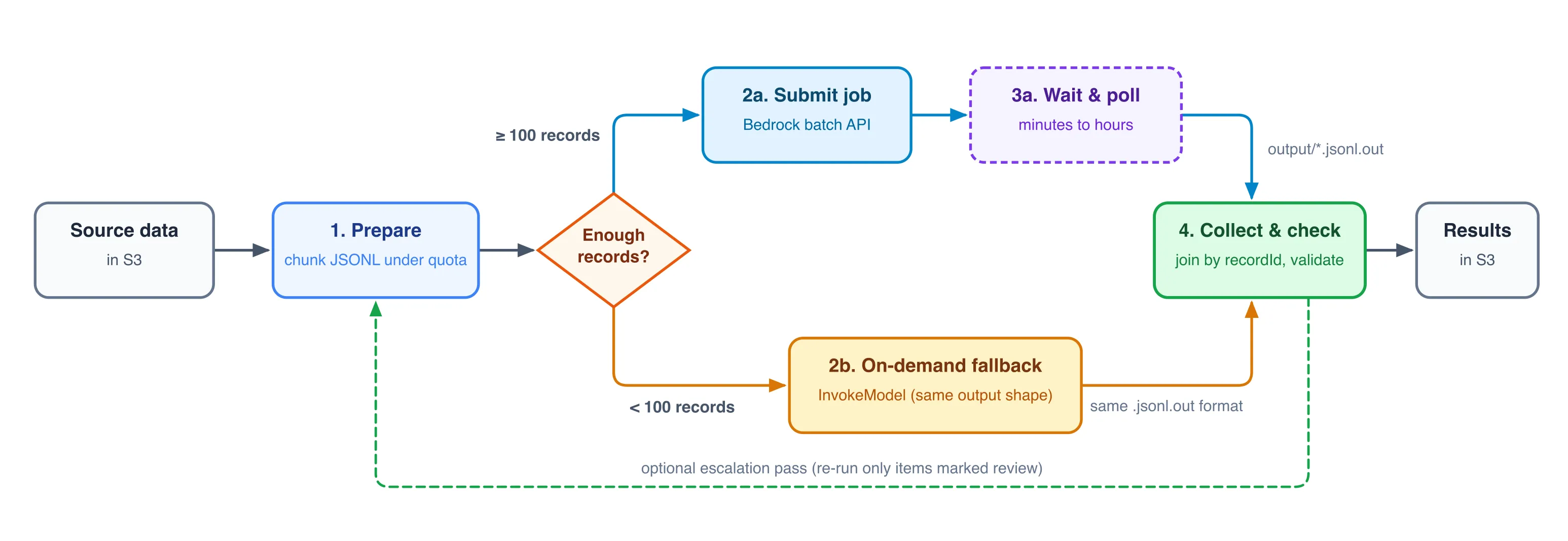
- Prepare: turn your source items into JSONL chunks in S3, staying under the per-file (1 GB) and per-job (5 GB) quotas.
- Branch on record count: if you have at least 100 records, submit a Bedrock batch job (
CreateModelInvocationJob) and wait/poll (GetModelInvocationJob) for minutes to hours until it hits a terminal state. If you have fewer than 100, fall back to on-demandInvokeModelcalls and write the answers in the exact same.jsonl.outformat. - Collect and validate: list all
.jsonl.outfiles under the output prefix, join answers back to your source data byrecordId, and run deterministic checks to split results intook,review, andfailed. - Optionally escalate: feed only the
reviewitems back into another pass (for example, with more pages or a heavier prompt) so you spend extra tokens only where needed.
Choosing an orchestrator
Once you accept that a batch run involves preparing files, branching on record count, submitting jobs, waiting for hours, and collecting results, you have to decide what drives that workflow. Here are the four options I weighed:
| Option | Pros | Cons |
|---|---|---|
| Script on a laptop / EC2 | Simple, zero AWS orchestration setup | Hours of babysitting, fragile, no recovery if the process dies, and logs aren’t persisted anywhere unless you build that yourself |
| EventBridge job-state events + Lambdas (choreography) | Serverless, event-driven, pay per use | State scattered across functions, hard to follow and hard to test end to end |
| AWS Step Functions (orchestration) | Built for long-running workflows, visual execution graph, built-in retries | No .sync integration for batch inference jobs, so you build the polling loop yourself; ASL / JSONata for non-trivial logic (chunk loops, fallbacks, multi-pass escalation) gets verbose fast |
| Lambda durable functions | Workflow is plain TypeScript; no compute billed while waiting; testable locally | New service (launched late 2025), replay model to learn, each invocation still has a timeout |
Let us be fair to each of these:
- A script on a laptop or EC2 instance is completely fine for a one-off experiment. If you are only ever going to run one job and you do not mind leaving a terminal open (or
tmuxon a small VM), do not over-engineer it. It stops being fun the moment you need multi-pass runs, retries after a crash, persisted logs you can inspect later (without building that persistence yourself), or something a teammate can trigger reliably. - EventBridge + separate Lambdas is the classic serverless choreography approach: one Lambda prepares and submits, an EventBridge rule catches Bedrock job state changes, another Lambda collects the results. It scales well, but because no single component owns the flow, the workflow itself disappears into infrastructure wiring. Tracing a multi-pass run means stitching together logs across multiple functions and DynamoDB state tables, and testing the full flow locally is painful.
- AWS Step Functions moves to explicit orchestration: a battle-tested choice for long-running AWS workflows where one state machine coordinates every step, and the visual execution view is genuinely nice when debugging production runs. The friction shows up when your control flow stops being a simple linear chain: looping over chunks, grouping chunks under a 4 GB quota, branching to on-demand below 100 records, and running conditional escalation passes. Expressing that in ASL (even with JSONata) is a lot more ceremony than writing a
forloop and anifstatement in TypeScript. There’s also no shortcut for the wait: Step Functions’ optimized Bedrock integration coversInvokeModelandCreateModelCustomizationJob(with.sync), but not batch inference. You can callCreateModelInvocationJobthrough the generic AWS SDK integration, which only fires the request, so you end up building the poll loop yourself out ofWaitandChoicestates. - Lambda durable functions sit right in the sweet spot for this workload. You write the entire workflow as one regular TypeScript Lambda handler. When the workflow waits for a Bedrock batch job, the function suspends and you pay no Lambda compute while it sleeps. You also get a local test runner that exercises the entire multi-invocation flow in milliseconds.
The trade-off with durable functions is real and worth stating plainly: it is a recent AWS service (launched late 2025), you have to learn its checkpoint-and-replay mental model, you have to respect determinism rules outside steps, and every invocation still runs under the function timeout (I set mine to 15 minutes), so each stretch of work between waits has to fit in it. For me, those trade-offs were much smaller than the cost of maintaining ASL state machines or scattered EventBridge handlers.
If you want a deeper dive into how Lambda durable functions work and how they stack up against AWS Step Functions, we dedicated an entire episode of the AWS Bites podcast to it: Episode 152: Exploring Lambda Durable Functions.
Lambda durable functions crash course
If you have never used Lambda durable functions before, here is the minimum you need to understand the code in the next section. If you want a fuller, more visual walkthrough of how they work, I gave a talk about durable functions earlier this year at the AWS Dublin User Group and I recommend having a look at the slides.
The durable execution SDK (@aws/durable-execution-sdk-js) wraps your normal Lambda handler with withDurableExecution and hands you a DurableContext (we will call it ctx). For our pipeline, we only need three methods on that context:
ctx.step(name, fn): runsfn, saves its return value in a checkpoint, and returns it.ctx.wait(name, duration): suspends the execution for a fixed time, then resumes it in a fresh Lambda invocation.ctx.waitForCondition(name, checkFn, options): repeatedly runscheckFnaccording to awaitStrategy, suspending the function between polls untilwaitStrategysays to stop.
The mental model to take away is checkpoint + replay. Whenever a durable execution wakes up after a wait (or retries after a failure), AWS starts a brand new Lambda invocation and runs your handler from the very top. When execution hits a ctx.step that already completed in an earlier invocation, the SDK does not run fn again: it immediately returns the saved checkpoint value in milliseconds and moves on to the next line.
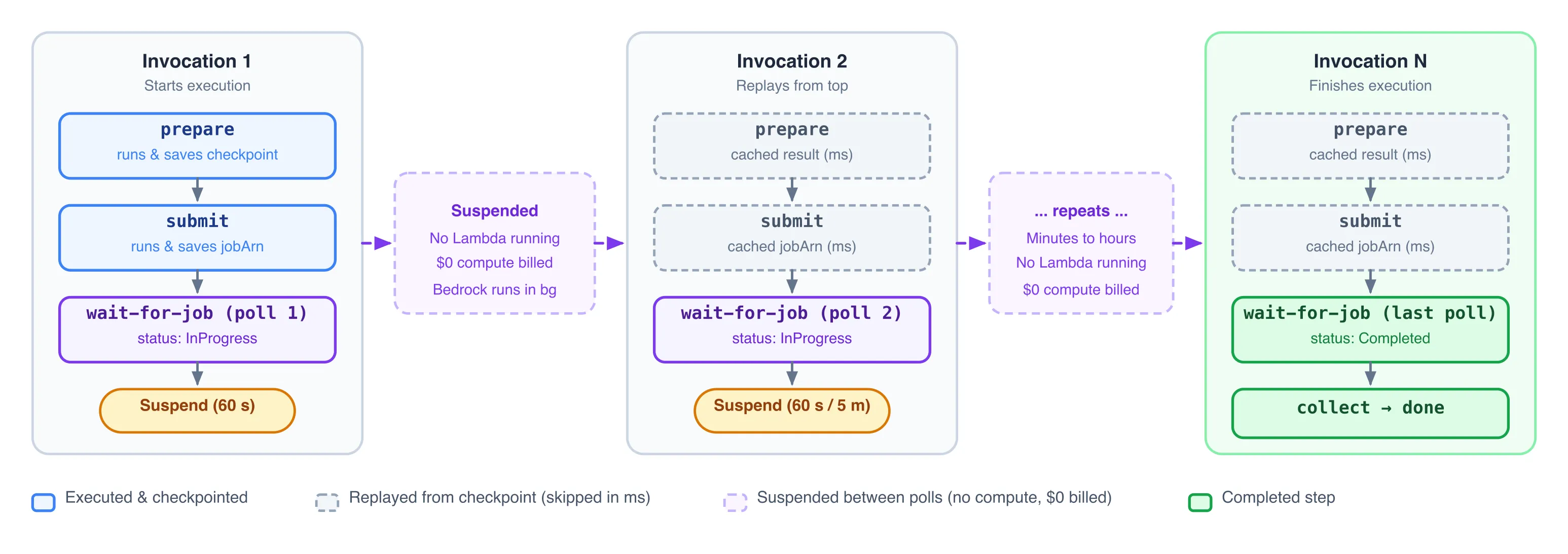
That replay model is what makes long waits free. Between two polls of waitForCondition, no invocation is running and you pay no Lambda compute, even if the Bedrock batch job takes hours.
It also implies three rules you have to respect. Break any of them and you will have a bad afternoon:
- Code outside
ctx.stepmust be deterministic. Because the handler replays from the top on every wake-up, anything you compute outside a step runs again on every replay. If you generate a timestamp-basedrunId(likeDate.now()) at the top of the handler, invocation 2 will compute a differentrunIdthan invocation 1 and look in the wrong S3 prefix. Put non-deterministic work (generating IDs, reading the current time, callingMath.random()) inside actx.step, or pass it in via the event payload. - Keep step results small. Checkpoints are meant for workflow coordination state, not payload data, and the quotas enforce it: at most 1 MB per operation and 100 MB of checkpoint data for the whole execution. In our pipeline,
preparewrites the JSONL file to S3 and returns only the record count (number), andsubmitreturns only thejobArn(string). Heavy data stays in S3; checkpoints hold keys and counts. - Make side effects idempotent. If a step fails halfway through (or times out right after calling an external API) and gets retried,
fncan run more than once. In our pipeline,submitpasses a deterministicclientRequestTokenderived fromevent.runId, so a retriedCreateModelInvocationJobcall gets back the same job instead of starting and billing a second one.
One last sizing note before we look at the code: a durable execution is capped at 30,000 operations, and the cap can’t be raised. That sounds abstract until you compare it to a real run: my 6,156-document pipeline (31 chunks, multiple passes, polling, collection) used fewer than 200 durable operations. You have plenty of headroom as long as you do not wrap every individual document in its own step.
The example, step by step
Time to build something concrete, so let us go back to the running example: extracting structured purchase orders from free-form supplier emails. For each email we want the supplier name, order number, currency, delivery date, line items (SKU, description, quantity, unit price), and total.
Why this task needs an LLM
Before writing a single line of Bedrock code, it is always worth asking whether you actually need an LLM at all. Here, the goal is to extract structured output (clean JSON with supplier, currency, delivery date, line items, and total) from unstructured text so downstream code can consume it reliably. Supplier emails are messy in ways that break regexes and templates on the first new vendor: quoted email threads where a later message corrects an earlier one (“make it 12, not 10”), product tables pasted as plain text, missing SKUs, and mixed languages.
If the job were only “which category does this support ticket belong to?”, a dedicated classification model such as Jev would probably be cheaper, faster, and simpler than batch LLM calls. Classifiers cannot return nested structured data like a variable-length list of order lines with quantities, unit prices, and a corrected total. That kind of messy-text-to-nested-JSON extraction is where generative models, and this batch pattern, earn their keep.
The workflow skeleton
Here is the overall shape of the durable Lambda handler. To keep the focus on the orchestration, I left out the boilerplate (AWS SDK clients, TypeScript interfaces, thin S3/JSONL helpers like getText, putText, listKeys, and parseJsonl, plus the buildRequest prompt builder and check validator); you can grab the complete, runnable handler.ts in the companion repository.
const MIN_BATCH_RECORDS = 100 // Bedrock rejects smaller batch jobsconst TERMINAL = new Set(['Completed', 'PartiallyCompleted', 'Failed', 'Stopped', 'Expired'])
export const handler = withDurableExecution(async (event: Event, ctx: DurableContext) => {  const dir = `runs/${event.runId}`
  // 1. Write one batch record per email. The data stays in S3: the checkpoint holds only a count.  const records = await ctx.step('prepare', async () => {    // ...see Step 1 below  })
  if (records >= MIN_BATCH_RECORDS) {    // 2a. Submit the batch job with a deterministic name / idempotency token.    const jobArn = await ctx.step('submit', async () => {      // ...see Step 2a below    })
    // 3a. Poll until the job reaches a terminal state (suspended between polls),    // then fail the run if the job ended as Failed, Stopped or Expired.    const job = await ctx.waitForCondition(      'wait-for-job',      async () => {        // ...see Step 3a below      },      { /* ...waitStrategy */ },    )    // ...see Step 3a below  } else {    // 2b. Too few records for a batch job: call the model directly and write the same output format.    await ctx.step('on-demand', async () => {      // ...see Step 2b below    })  }
  // 4. Parse outputs, run deterministic checks, and write results.jsonl.  return ctx.step('collect', async () => {    // ...see Step 4 below  })})
Let us fill in each step in order, then look at the deliberate simplifications.
Step 1: prepare
// 1. Write one batch record per email. The data stays in S3: the checkpoint holds only a count.const records = await ctx.step('prepare', async () => { const emails = parseJsonl<Email>(await getText(event.inputKey)) const lines = emails.map((e) => JSON.stringify({ recordId: e.id, modelInput: buildRequest(e.text) }), ) await putText(`${dir}/input/records.jsonl`, `${lines.join('\n')}\n`) return emails.length})prepare reads the raw input JSONL from S3, builds one Bedrock batch record per email using buildRequest, writes the resulting records.jsonl under runs/<runId>/input/, and returns emails.length. Notice rule 2 in action: the entire prepared file stays in S3, and the durable checkpoint stores a single integer.
Branching on record count
Right after prepare, a plain if (records >= MIN_BATCH_RECORDS) decides whether to submit a Bedrock batch job or fall back to on-demand calls. Because records came from a checkpointed step, every replay takes the exact same branch.
Step 2a: submit
const jobArn = await ctx.step('submit', async () => { const name = `orders-${event.runId}`.slice(0, 63) const res = await bedrock.send( new CreateModelInvocationJobCommand({ jobName: name, clientRequestToken: name, roleArn: BATCH_ROLE_ARN, modelId: MODEL_ID, inputDataConfig: { s3InputDataConfig: { s3Uri: `s3://${BUCKET}/${dir}/input/`, s3InputFormat: 'JSONL' }, }, outputDataConfig: { s3OutputDataConfig: { s3Uri: `s3://${BUCKET}/${dir}/output/` } }, timeoutDurationInHours: 24, }), ) if (!res.jobArn) { throw new Error('Bedrock returned no job ARN') } return res.jobArn})Two details matter here. First, name is derived deterministically from event.runId and sliced to 63 characters to respect Bedrock’s job-name limit. Second, we pass that same name as clientRequestToken. If Lambda retries submit after a transient timeout, Bedrock recognises the token and ignores the repeated request instead of spinning up a duplicate job. Once submit succeeds, jobArn is checkpointed and CreateModelInvocationJob will never be called again for this execution.
Step 3a: wait-for-job
const job = await ctx.waitForCondition( 'wait-for-job', async () => { const res = await bedrock.send(new GetModelInvocationJobCommand({ jobIdentifier: jobArn })) const status = res.status ?? 'Unknown' return { status, done: TERMINAL.has(status) } }, { initialState: { status: 'Submitted', done: false }, waitStrategy: (state, attempt) => state.done ? { shouldContinue: false } : { shouldContinue: true, delay: { seconds: attempt <= 10 ? 60 : 300 } }, },)// Failed, Stopped or Expired: there is nothing (or nothing reliable) to collect.if (job.status !== 'Completed' && job.status !== 'PartiallyCompleted') { throw new Error(`Batch job ${jobArn} ended as ${job.status}`)}This is where durable functions pay for themselves. waitForCondition calls GetModelInvocationJob, checks whether the job’s status is in our TERMINAL set, and if not, suspends the execution. Our waitStrategy polls every 60 seconds for the first 10 attempts (which catches fast jobs quickly), then backs off to every 5 minutes (300 seconds) for longer runs. Between polls, no invocation is running and you pay no Lambda compute.
Once the job reaches a terminal state, we check how it ended. A Failed, Stopped, or Expired job has nothing reliable to collect, so we throw and the durable execution fails visibly instead of reporting an empty success. Throwing outside a step is safe here: job comes from a checkpoint, so every replay makes the same decision.
Step 2b: on-demand
await ctx.step('on-demand', async () => { const input = parseJsonl<{ recordId: string; modelInput: unknown }>( await getText(`${dir}/input/records.jsonl`), ) const lines: string[] = [] for (const r of input) { try { const res = await runtime.send( new InvokeModelCommand({ modelId: MODEL_ID, contentType: 'application/json', body: JSON.stringify(r.modelInput), }), ) const modelOutput = JSON.parse(Buffer.from(res.body).toString('utf8')) lines.push(JSON.stringify({ recordId: r.recordId, modelOutput })) } catch (err) { lines.push( JSON.stringify({ recordId: r.recordId, error: { errorMessage: String(err) } }), ) } } await putText(`${dir}/output/direct/records.jsonl.out`, `${lines.join('\n')}\n`)})The trick here is format unification. When we have fewer than 100 records, on-demand reads the exact same input/records.jsonl file that prepare wrote, sends each modelInput to InvokeModel, and writes the answers to output/direct/records.jsonl.out in the exact same { recordId, modelOutput | error } format that Bedrock batch writes. Because both paths land under runs/<runId>/output/ with a .jsonl.out suffix, the collect step does not need to know or care which path produced the answers.
Step 4: collect
return ctx.step('collect', async () => { const results: string[] = [] const count = { ok: 0, review: 0, failed: 0 } const seen = new Set<string>() for (const key of (await listKeys(`${dir}/output/`)).filter((k) => k.endsWith('.jsonl.out'))) { for (const r of parseJsonl<OutputRecord>(await getText(key))) { seen.add(r.recordId) const text = r.modelOutput?.content[0]?.text let order: Order | undefined try { order = text ? (JSON.parse(text) as Order) : undefined } catch { order = undefined // not JSON: counts as failed, like an error record } if (!order) { count.failed++ results.push(JSON.stringify({ id: r.recordId, status: 'failed', error: r.error })) continue } const checksFailed = check(order) const status = checksFailed.length ? 'review' : 'ok' count[status]++ results.push(JSON.stringify({ id: r.recordId, status, checksFailed, order })) } } // Records with no output line at all (e.g. a job that timed out as PartiallyCompleted). for (const { recordId } of parseJsonl<{ recordId: string }>( await getText(`${dir}/input/records.jsonl`), )) { if (!seen.has(recordId)) { count.failed++ results.push(JSON.stringify({ id: recordId, status: 'failed', error: 'no output' })) } } await putText(`${dir}/results.jsonl`, `${results.join('\n')}\n`) return { records, ...count }})collect lists everything under runs/<runId>/output/, filters for .jsonl.out (which skips Bedrock’s manifest.json.out), parses every record, and runs our deterministic check(order) function: do the line items add up to total, is currency a three-letter ISO code, is deliveryDate a valid date? Records that pass are marked ok; records that fail a check are marked review with the reasons attached; records that returned an API error or invalid JSON are marked failed. Finally, collect reads the input file again and marks any record with no output line at all as failed: that is what a PartiallyCompleted job leaves behind when it runs out of time.
That ok vs review split is more than just neat bookkeeping. In the escalation passes section later on, those review items are the exact hook that lets us run cheaper escalation passes.
Deliberate simplifications in this example
To keep handler.ts readable in one sitting, I cut a few corners that you should be aware of before taking this to production:
- One job, one input file. A real pipeline with thousands of documents needs chunking, multiple jobs if you approach the size quota, and the pause trick (covered in the next section).
ListObjectsV2without pagination. Fine when you have fewer than 1,000 output files; paginate withContinuationTokenif you expect more.- Minimal validation checks. Here we check line totals, currency, and date. On my real project I ran domain-specific deterministic checks (such as check digits on IDs). Pick checks that catch the mistakes the model is most likely to make in your domain.
- No runtime schema validation. We do
JSON.parse(text) as Orderand rely oncheck. In production, validate the parsed object with Zod or Valibot, or use tool calling with a JSON schema to constrain the model’s output. - Sequential on-demand calls. Our
on-demandloop awaits oneInvokeModelcall at a time; for fewer than 100 records, adding a small concurrency pool speeds it up nicely.
The CDK infrastructure
Deploying a durable function that drives Bedrock batch jobs requires a few specific pieces of infrastructure. Here is the core of the AWS CDK stack in TypeScript:
// An inference profile routes requests to several regions: allow the profile and the model.const profileId = `${inferenceProfile}.${modelId}` // e.g. eu.anthropic.claude-opus-5const modelArns = [  `arn:aws:bedrock:${this.region}:${this.account}:inference-profile/${profileId}`,  `arn:aws:bedrock:*::foundation-model/${modelId}`,]
// The role Bedrock assumes to read the input and write the output.const batchRole = new iam.Role(this, 'BatchRole', {  assumedBy: new iam.ServicePrincipal('bedrock.amazonaws.com', {    conditions: {      StringEquals: { 'aws:SourceAccount': this.account },      ArnLike: {        'aws:SourceArn': `arn:aws:bedrock:${this.region}:${this.account}:model-invocation-job/*`,      },    },  }),})bucket.grantReadWrite(batchRole, 'runs/*')batchRole.addToPolicy(  new iam.PolicyStatement({ actions: ['bedrock:InvokeModel'], resources: modelArns }),)
const fn = new NodejsFunction(this, 'Workflow', {  entry: 'src/handler.ts',  runtime: lambda.Runtime.NODEJS_24_X,  architecture: lambda.Architecture.ARM_64,  memorySize: 1024,  timeout: cdk.Duration.minutes(15), // per invocation  durableConfig: {    executionTimeout: cdk.Duration.hours(72), // the whole execution, waits included    retentionPeriod: cdk.Duration.days(30),  },  environment: {    BUCKET: bucket.bucketName,    MODEL_ID: profileId,    BATCH_ROLE_ARN: batchRole.roleArn,  },})
// Checkpoints and replay state for the durable execution.fn.role?.addManagedPolicy(  iam.ManagedPolicy.fromAwsManagedPolicyName(    'service-role/AWSLambdaBasicDurableExecutionRolePolicy',  ),)bucket.grantReadWrite(fn)
// On-demand calls (fewer than 100 records), then the batch job itself.fn.addToRolePolicy(  new iam.PolicyStatement({ actions: ['bedrock:InvokeModel'], resources: modelArns }),)const jobs = `arn:aws:bedrock:${this.region}:${this.account}:model-invocation-job/*`fn.addToRolePolicy(  new iam.PolicyStatement({    actions: ['bedrock:CreateModelInvocationJob'],    resources: [jobs, ...modelArns],  }),)fn.addToRolePolicy(  new iam.PolicyStatement({    actions: ['bedrock:GetModelInvocationJob', 'bedrock:StopModelInvocationJob'],    resources: [jobs],  }),)
// The function needs to hand the batch role to Bedrock.fn.addToRolePolicy(  new iam.PolicyStatement({    actions: ['iam:PassRole'],    resources: [batchRole.roleArn],    conditions: { StringEquals: { 'iam:PassedToService': 'bedrock.amazonaws.com' } },  }),)
// A durable function is invoked through a version or alias, never the bare function name.const alias = new lambda.Alias(this, 'LiveAlias', {  aliasName: 'live',  version: fn.currentVersion,})
Four pieces worth calling out here:
- Two timeouts, two meanings.
timeout: cdk.Duration.minutes(15)is the normal Lambda per-invocation timeout.durableConfig.executionTimeout: cdk.Duration.hours(72)covers the entire durable execution, waits included. Set it comfortably longer than your 24-hour batch job timeout, especially if you run multiple passes. - The durable execution managed policy.
service-role/AWSLambdaBasicDurableExecutionRolePolicygives the function permission to manage its checkpoints and replay state. Forget it and the execution fails immediately. - Bedrock and S3 permissions. Besides
iam:PassRoleonbatchRole, the function needs read/write access to the bucket,bedrock:CreateModelInvocationJobandbedrock:GetModelInvocationJobfor the batch path, andbedrock:InvokeModelfor the on-demand fallback. This is where the inference profile gotcha from earlier shows up:modelArnsholds both the inference profile ARN in your region and the foundation model ARN with a region wildcard, and the batch role getsbedrock:InvokeModelon the same two ARNs. - Always invoke through a version or alias. A durable function can’t be invoked by its unqualified name or ARN: you must target a published version, an alias (like
:live), or$LATEST(fine for experiments, not for production). That ensures replays run against the exact same code version that started the execution.
Triggering a run from the CLI looks like this, where $FUNCTION_ARN is the FunctionArn stack output (the ARN of the live alias):
aws lambda invoke \ --function-name "$FUNCTION_ARN" \ --invocation-type Event \ --cli-binary-format raw-in-base64-out \ --payload '{"runId":"run-01","inputKey":"input/emails.jsonl"}' \ /dev/null--invocation-type Event fires it off asynchronously, and from there the durable runtime takes over. That matters: a synchronous invocation of a durable function is capped at 30 minutes, while an asynchronous one can run for the whole execution timeout.
Scaling it up
The reference example above handles a single input file and a single pass. On my real project (6,156 scanned PDFs, averaging 2.6 pages each, rendered to PNG at 150 dpi at roughly 2,300 input tokens per page), I added five patterns on top of that exact skeleton. None of them changed the core shape of the workflow.
Chunking and the “pause” trick
Rendering thousands of PDF pages to PNG and writing JSONL files in a single prepare step will either blow past the invocation timeout or lose all progress if something fails halfway through.
The fix is to process documents in chunks (I used 31 chunks of 200 documents; rendering the first pages of a 200-document chunk took about 10 seconds on a 10 GB / 6 vCPU Lambda), with one ctx.step per chunk. Then, after every K chunks, you insert a 1-second ctx.wait:
const STEPS_PER_INVOCATION = 8
for (let i = 0; i < chunks; i++) {  await ctx.step(`prepare-${i}`, () => prepareChunk(i))  if ((i + 1) % STEPS_PER_INVOCATION === 0) {    // A one-second wait ends the invocation; the next one starts with a fresh 15 minutes.    await ctx.wait(`prepare-pause-${i}`, { seconds: 1 })  }}
That 1-second wait ends the current Lambda invocation and schedules the next one with a fresh timeout (a full 15 minutes, with my configuration). All previous chunks are already checkpointed, so the new invocation replays past them in milliseconds and picks up at chunk i + 1.
Retrying transient step failures
For throttling or transient S3 errors, attach a retryStrategy to individual steps with createRetryStrategy:
import { createRetryStrategy } from '@aws/durable-execution-sdk-js'
// A failed step is retried twice with backoff: throttling and transient S3 errors are the usual cause.const retryStrategy = createRetryStrategy({  maxAttempts: 3,  initialDelay: { seconds: 10 },  maxDelay: { minutes: 2 },  backoffRate: 2,})
await ctx.step('submit', () => submitJob(), { retryStrategy })
Combined with a deterministic clientRequestToken, retrying submit is completely safe.
Multi-job assembly
Once prepared chunks live as separate JSONL files in S3, group them into batch jobs under your size margin (4 GB against the 5 GB quota). Groups of 100 or more records go to Bedrock batch; any trailing group under 100 records goes on demand.
Escalation passes: progressive refinement at batch prices
This was my favourite pattern from the whole project, and the one that generalises best. Most of my 6,156 scanned PDFs had the invoice on page 1, so sending all 2.6 pages up front would have wasted tokens. Instead, deterministic validators (such as check digits on IDs and cross-field totals) decided what was “done” after each pass:
- Pass 1: page 1 of all 6,156 documents (batch).
- Pass 2: last page for the 439 multi-page documents that failed validation in pass 1 (batch). The other 171 failures had a single page, so there was no other page to try.
- Pass 3: all pages for the 207 remaining
reviewdocuments that still had unseen middle pages (batch).
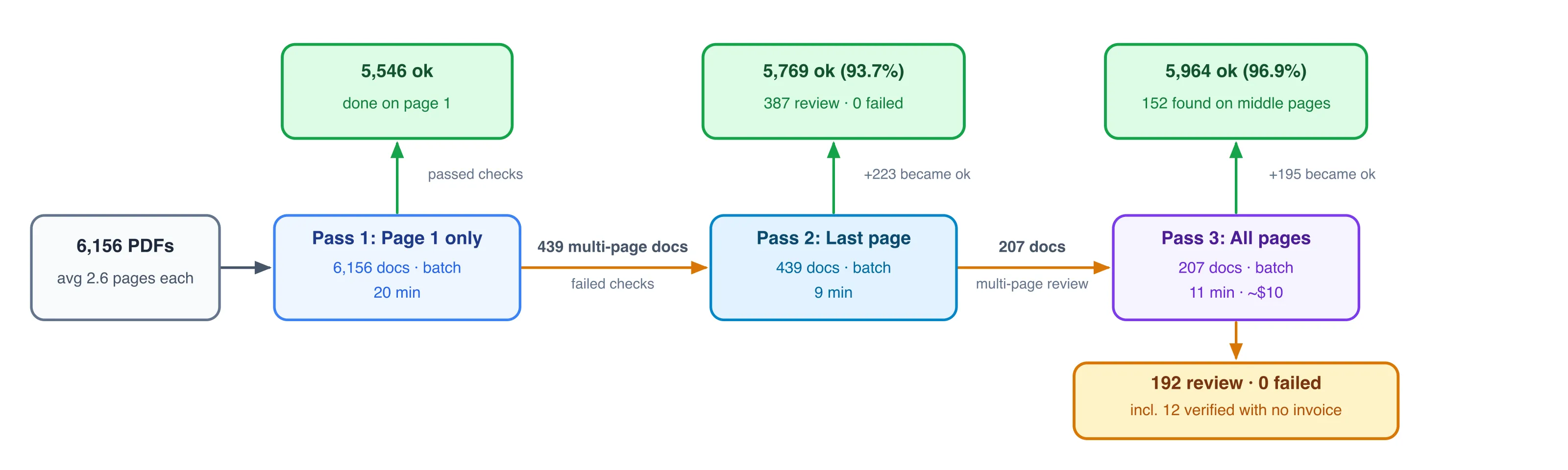
Here is what those escalation passes produced on the real dataset:
| After | ok | review | failed |
|---|---|---|---|
| Pass 1 (page 1) + pass 2 (last page) | 5,769 (93.7%) | 387 | 0 |
| + pass 3 (all pages, 207 docs) | 5,964 (96.9%) | 192 | 0 |
Pass 2 turned 223 of its 439 documents into ok. It also gave a nice validation of keeping both the batch and on-demand paths wired up: based on my 50-document golden set, I expected fewer than 100 documents to need pass 2 (so I assumed it would run on demand). When 439 needed it in the real run, the pipeline automatically routed pass 2 to a 9-minute batch job with no code changes. Pass 3 then ran on 207 of the 387 remaining review documents: the other 180 were 1- or 2-page PDFs whose pages had already been inspected across passes 1 and 2, so re-sending “all pages” would not have shown the model anything new. Pass 3 turned 195 more into ok (152 had the invoice on a middle page) for about $10. Of the 12 documents still marked “no invoice found” after seeing every page, manual inspection showed all 12 genuinely had no invoice: the validators and the model were right.
The general idea is progressive refinement at batch prices: start with the cheapest context that solves most inputs, let deterministic code catch failures, and spend more tokens only on the leftovers.
Resumable runs and cost accounting
Two operational habits paid off immediately:
- Resumable runs (
baseRunId). Passing an optionalbaseRunIdlets a new run load already-okresults from an earlier run and process only what is missing. That is how I ran pass 3 over just 207 documents without touching the 5,769 already done. - Per-pass cost accounting. Sum the
usageobject on every response, price batch and on-demand calls separately, and log totals per pass. Keep token prices configurable rather than hardcoded, since hardcoded numbers are estimates until you check Cost Explorer.
Here are the full numbers from my three runs (costs are approximate, based on token counts at the Opus 5 EU inference profile prices of $5.50 / $27.50 per MTok, batch at 50%):
| Run | Docs | Wall clock | Batch job time | Tokens in / out | Approx. cost |
|---|---|---|---|---|---|
| Trial (200 docs) | 200 | ~11 min | ~9 min (6 min queued + validating, ~3 min processing) | 627k / 40k | $2.35 ($2.21 batch + $0.13 on demand) |
| Full run, passes 1–2 | 6,156 | 36 min | pass 1: 20 min for 6,156 records; pass 2: 9 min for 439 | 20.1M / 1.37M | $74.06 |
| Continuation, pass 3 (all pages) | 207 | 11 min | not recorded (207/207 records processed) | 3.54M / 36k | $10.25 |
| Total for the 3 runs | $86.66 |
Adding the two on-demand golden-set evaluations (~$1.20 each, ~$2.40 total) brings the whole project’s model spend to roughly $89. That works out to about 1.2¢ per document for the full run ($74.06 / 6,156), or 1.4¢ per document across all three runs ($86.66 / 6,156). You can multiply that by your own document volume to get a rough sense of scale.
Testing and local runs
One of the biggest reasons I picked Lambda durable functions over Step Functions or EventBridge choreography is testability. Two patterns made development much faster.
The Driver abstraction
In my real codebase, the workflow does not import DurableContext directly. Instead, it lives in a plain runWorkflow(event, driver, ...) function that accepts a tiny Driver interface with three methods: step, waitUntil, and pause:
export interface Driver {  /** Runs fn once and remembers its result. The result must be small JSON. */  step<T>(name: string, fn: () => Promise<T>): Promise<T>  /** Repeats check until it reports done, waiting delaySeconds(attempt) between attempts. */  waitUntil<T extends { done: boolean }>(    name: string,    check: () => Promise<T>,    delaySeconds: (attempt: number) => number,  ): Promise<T>  /** A point where a long run of steps may be cut, so no single invocation runs too long. */  pause(name: string): Promise<void>}
/** Runs everything in this process: no checkpoints, real waiting. For local runs and evals. */export function localDriver(): Driver {  return {    step: (_name, fn) => fn(),    async waitUntil(_name, check, delaySeconds) {      for (let attempt = 1; ; attempt++) {        const state = await check()        if (state.done) return state        await new Promise((r) => setTimeout(r, delaySeconds(attempt) * 1000))      }    },    pause: async () => {},  }}
In Lambda, durableDriver(ctx) maps step to ctx.step, waitUntil to ctx.waitForCondition (with a waitStrategy that stops when state.done is true), and pause to ctx.wait(name, { seconds: 1 }). Locally, localDriver() runs the exact same workflow function in a single Node.js process on your laptop. That is how I ran my 50-document golden-set evaluations with on-demand calls for about $1.20 per run, iterating on prompts and validators in minutes without deploying anything.
Testing replays with LocalDurableTestRunner
The local driver tests your business logic, but it does not test checkpointing, suspension, or replay behaviour. For that, the durable SDK ships @aws/durable-execution-sdk-js-testing with LocalDurableTestRunner:
import assert from 'node:assert/strict'import { after, before, it } from 'node:test'import { type DurableContext, withDurableExecution } from '@aws/durable-execution-sdk-js'import { LocalDurableTestRunner } from '@aws/durable-execution-sdk-js-testing'
// skipTime: waits complete instantly, so a "24 hour" batch wait takes milliseconds.before(() => LocalDurableTestRunner.setupTestEnvironment({ skipTime: true }))after(() => LocalDurableTestRunner.teardownTestEnvironment())
it('completes a run across batch waits, pauses and replays', async () => {  let invocations = 0  const handler = withDurableExecution(async (event: unknown, ctx: DurableContext) => {    invocations++    return runWorkflow(event, durableDriver(ctx), fakeBedrock)  })  const runner = new LocalDurableTestRunner({ handlerFunction: handler })  const result = await runner.run({ payload: { runId: 'test-01', inputKey: 'input/docs.jsonl' } })  assert.equal(result.getResult().failed, 0)  // The waits must suspend the function and resume it in a new invocation (a replay).  assert.ok(invocations > 1)})
With skipTime: true, a simulated 24-hour wait finishes in milliseconds, and the test runner genuinely suspends and re-invokes your handler so you exercise real replays (invocations > 1). In my real test suite, I also asserted that every document was downloaded and prepared exactly once across all those replays, even though the handler itself ran multiple times. The companion repo has the same kind of test for the handler in this article: aws-sdk-client-mock stands in for S3 and Bedrock, and the tests check that 150 emails go through exactly one batch job submission, even though the handler runs several times. They also check that an expired job fails the run and that records a partially completed job never processed come out as failed. That is the property that actually protects your bill in production, and catching a broken checkpoint or a non-deterministic step name in a fast local unit test is much nicer than discovering it halfway through a real Bedrock run.
When NOT to do this
Like every AWS pattern, this one is not a silver bullet. Skip Bedrock batch inference and durable orchestration if any of these apply to your workload:
- Someone is waiting for the answer. If a user is staring at a UI or an API caller expects a response in seconds, batch inference is the wrong tool. Call the model on demand (or stream it) and optimise your prompt and model choice instead.
- You only have a few dozen or a couple hundred items. Between Bedrock’s 100-record minimum, the S3 staging, the IAM service role, and the durable execution setup, small workloads do not pay back the plumbing. On-demand calls with a small concurrency pool will finish in a minute and cost pennies. The same goes for very cheap models: before building anything, I estimated my whole 6,156-document workload at about $4 on demand with Haiku 5.5, so batch would have saved me $2.
- You need answers by a hard deadline. Bedrock batch inference has no latency SLA. My 6,156-document job finished in 20 minutes, which was great, but a job can legitimately sit in the queue for hours or hit its 24-hour timeout. If you have a strict SLA to meet, on-demand inference (or provisioned throughput) is the safer bet.
Wrapping up
When you strip away the AWS boilerplate, this whole architecture comes down to two ideas:
- Bedrock batch inference cuts your token bill roughly in half for offline workloads, as long as you design around its sharp edges. Keep an on-demand fallback for runs under 100 records, unify the output format, key everything by
recordId, use deterministicclientRequestTokenvalues, and check the model card before you write any code. On my 6,156-document workload, that brought the cost down to roughly 1.2¢ per document for the main run (~1.4¢ including pass 3). - Lambda durable functions let you write multi-hour orchestration as plain TypeScript, as long as you follow three rules. Keep code outside
ctx.stepdeterministic, keep checkpoints small (data in S3, keys and counts in checkpoints), and make side effects idempotent.
Combine those with deterministic validators and escalation passes, and you get a pipeline that spends expensive tokens only where they are genuinely needed, sleeps without paying for compute while Bedrock does the heavy lifting, and can be tested end to end on your laptop in milliseconds.
All the code from this article is in the companion repository: the complete handler.ts, the CDK stack, a LocalDurableTestRunner test suite, and a generator for messy sample supplier emails.
Further reading
- Amazon Bedrock batch inference documentation
CreateModelInvocationJobAPI reference- AWS Lambda durable functions documentation
- Anthropic Message Batches API documentation
If you have built something similar with Bedrock batch inference, Step Functions, or Lambda durable functions, I would love to hear how it went and what sharp edges you ran into. Feel free to drop a note in the comments below or reach out on Bluesky.